Method 1: Traditional relational table with VECTOR columns – ORDS AutoREST + 26ai makes vectorSearch EASY
I have…
- Oracle AI Database 23.26.x
- ORDS 26.2
- Existing REST Enabled Table
- with the VECTOR column, explaining all comments from my blog
- A local web application that allows me to browse/search my comments
I had to write Zero code to enable proximity/similarity search.
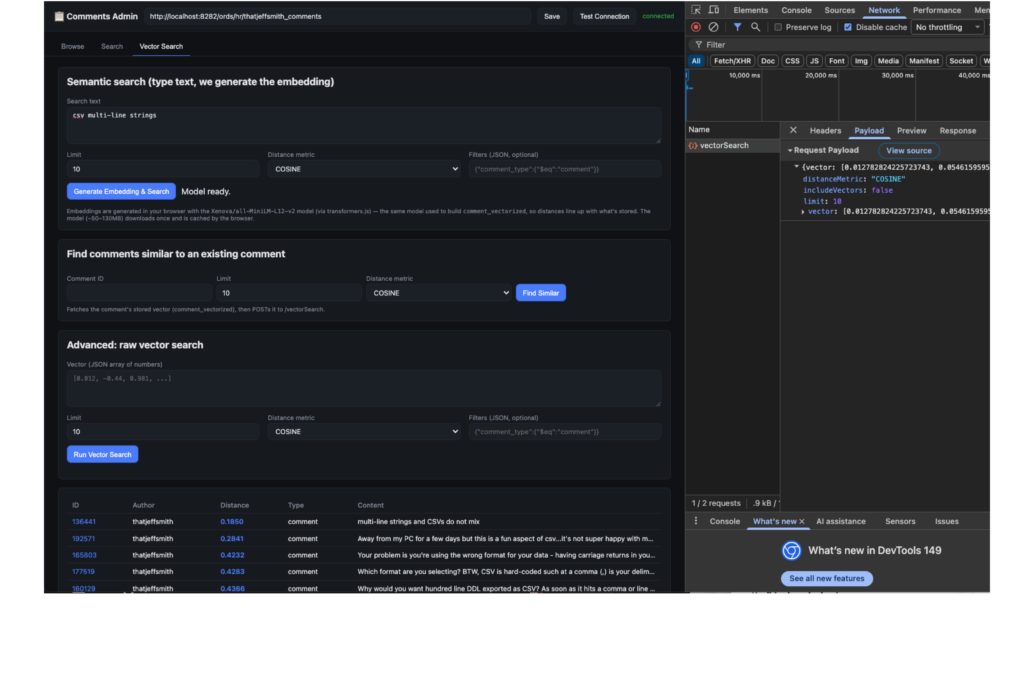
All I needed was to share the OpenAPI spec describing my ORDS managed REST API with my Agent (Claude Desktop), and it created a web app for me, simply by calling the API.
Here’s what we added earlier this year that makes all this possible –
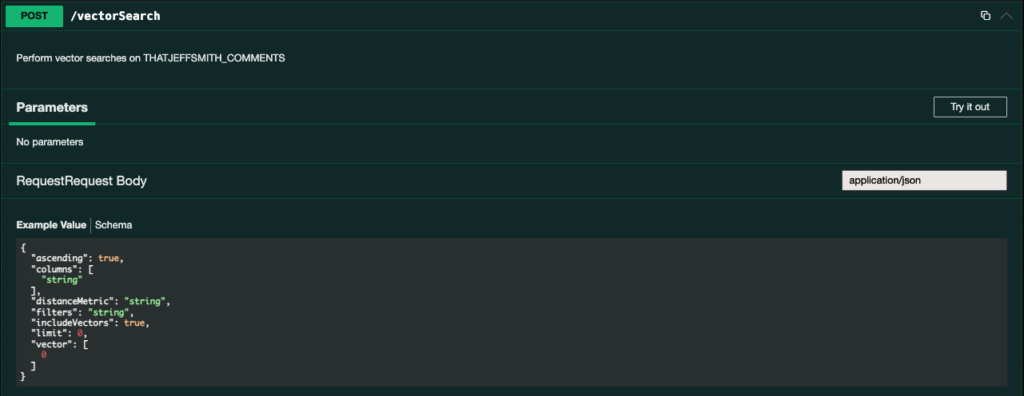
cURL will look like this –
Curl

curl -X 'POST' \
 'http://localhost:8282/ords/hr/thatjeffsmith_comments/vectorSearch' \
 -H 'accept: application/json' \
 -H 'Content-Type: application/json' \
 -d '{
 "ascending": true,
 "columns": [
 "string"
 ],
 "distanceMetric": "string",
 "filters": "string",
 "includeVectors": true,
 "limit": 0,
 "vector": [
 0
 ]
}'
And my local web application calls it as –

REST API returns appropriate records –
Note that the Vector arrays stored in ‘close’ or ‘similar’ records are NOT included, because I set ‘includeVectors’ to false in the HTTPS POST request.

The only meaningful code is that my web search should produce a Vector Search input string, and for that to happen I need to know how the vectors stored in my database are generated (the all-MiniLM-L12-v2 transformer model).
The database does not have to generate these vectors, it can only be used to store/query them – that’s your choice.
Our AUTOREST API now recognizes that you have a VECTOR column in the 26ai database, and now includes a new POST action item, in addition to the current batchLoad.
So my javascript could be as simple as –
const data = await api("/vectorSearch", { method:"POST", body: JSON.stringify(body) });And I don’t have any code in the web app, middle tier, or database that I have to maintain to make those endpoints available. It’s just a toggle switch in ORDS!
Yes, it supports Hybrid Search.
I can include a search predicate in my call to the /vectorSeach endpoint. This is VERY important, but I’ll show you why in my next example.
Method 2: JSON object with VECTOR attribute – Vector Database REST API for full Vector CRUD management
I have…
- Oracle AI Database 23.26.x
- ORDS 26.2
- there is no data in my database yet
- there is no application yet
What if you really like the ‘schema on read’ or NoSQL approach like we do for JSON in databases, but you also really want to be able to do VECTOR similarity searches? Then this feature might be for you!
ORDS now includes MANY REST APIs for managing the VECTOR features of your Oracle AI database. There are so many, it’s hard for me to fit them all in one screenshot –
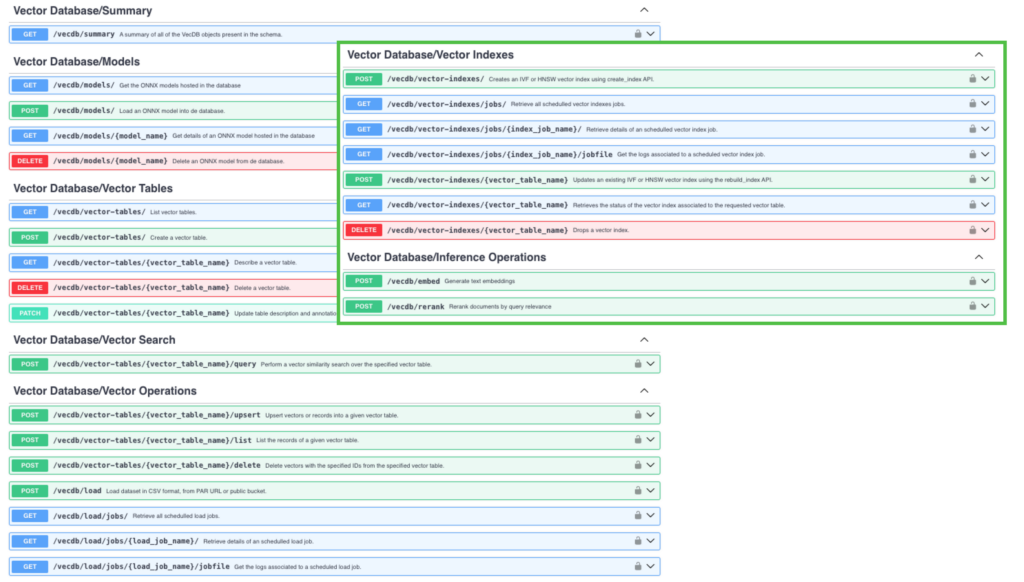
Features covered include:
- transformer model management – ONNX models are loaded into the database
- vector tables – list, create, update, delete (DDL) database managed tables, have your data (JSON) including attributes you define that have calculated VECTOR values
- vector search
- vector table – VECTOR table managed by database query/load (DML).
- vector index management, creating vector indexes, managing vector index jobs
With so many endpoints set aside to manage and work with VECTOR in your database, you might think we could do a lot more…
We also included a Web GUI!
If your database user has the DB_DEVELOPER_ROLE role and the CREATE DATA MINING privilege (don’t ask, it’s a long story), then when you log in to SQL Developer Web and 26ai database, you will see this –
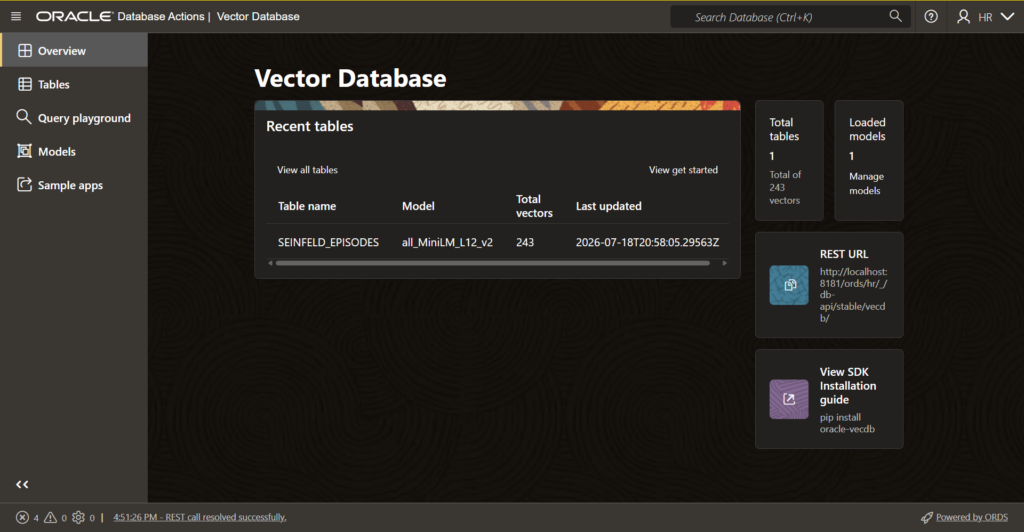
Let’s build something, silly
My favorite character on the US television show SEINFELD is George Costanza. I’m going to make a VECTOR table that includes a synopsis of every Seinfeld episode, PLUS all of George’s dialogue. And in that JSON object, I’ll have a VECTOR that describes the rows.
So, I can search and easily find exactly when/where George said something that made me laugh, but I can’t remember the EXACT quote.
I have a Kaggle account, and they easily had the dataset I needed.
I wrote some python code to convert/merge two data sets into JSON. I also need to break down the notes, because in some episodes, George has over 4,000 characters of dialogue, and that’s the maximum size for character/text content that we want his VECTOR database to generate and maintain.
Consideration #1: Where will we generate the Vector values?
The overall solution for databases is to load the ONNX model into the database and let the database handle it. Another option is to create it yourself and you keep the VECTOR value.
I’ve already loaded the ONNX model, so I’ll just use the full route.
My Source Data Looks like this –

“Content” is a concatenation of all the string arrays of “dialogues”, but also just GEORGE’s dialogues. If the text exceeds 4K characters, we have to split it into multiple notes, and I want to limit that as much as possible. So I can’t look for what Kramer said, only George’s sentence.
The “content” attribute is important.
When we create a new VECTOR table, we have to identify the JSON mapping pattern for what we want to vectorize.
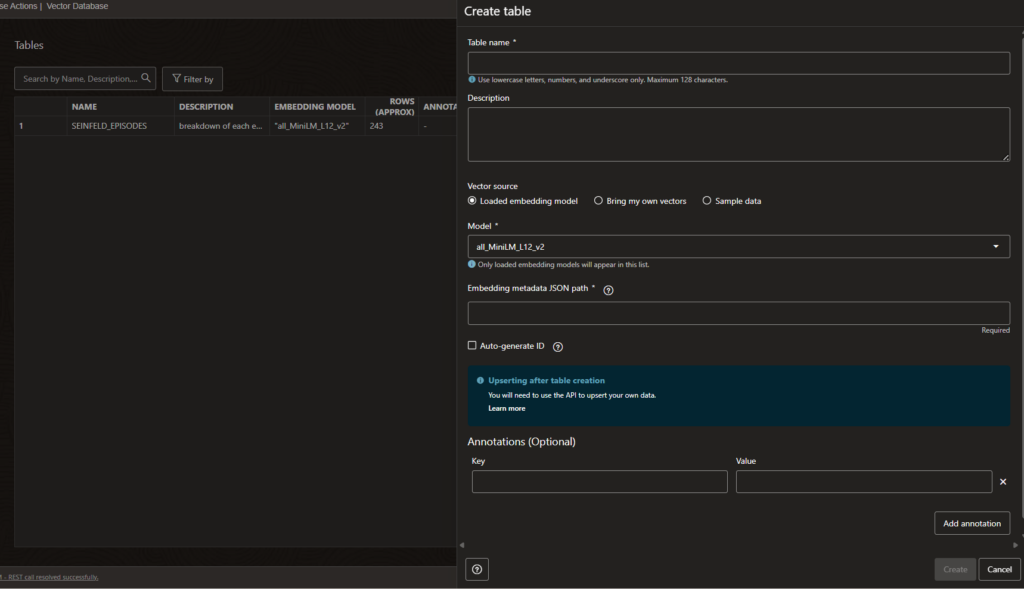
So to embed the JSON* metadata path, I’ll just say, ‘content’. I can provide an optional Annotation if I want – this could be VERY useful for LLMs who need to work with my data later, but I’ll leave it blank. I’ll also check ‘Generate ID automatically’, so the database will maintain the primary key value for me.
I can click ‘Create’, and my table will appear on the TABLES page. Of course I can also see it in the database –
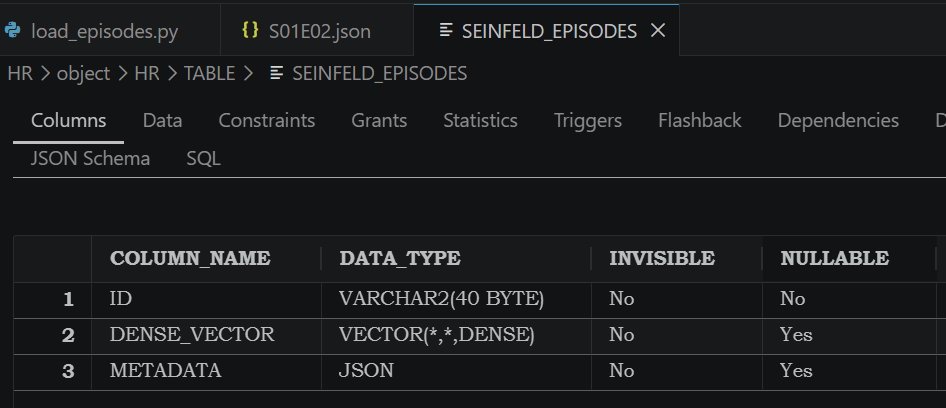
Time to load my data
UI was happy to share some examples of cURLs that I could use to batch load my notes. I took it and built some python to do the same thing, all at once for me, and it handles truncation of notes for me, but in general I upload one JSON file per episode.
When each record is loaded, the database takes the text from the “content” attribute, and calculates the VECTOR using the transformer model defined for that table. The data goes into the DENSE_VECTOR column.

On my complicated windows laptop, it took a few minutes to process about 200 records.
Once that’s done, we’re ready to query!
Playing on the Playground Vector Search
One of George’s more famous lines is when he saves a whale that was choking on a golf ball that Kramer had taken out to sea.
“The sea was angry that day, friends – like an old man trying to send soup back to the grocery store”
I can open the Query playground, select our table, enter the text I want to search for “The ocean is very angry”, select ‘Text search’ – the db will convert it to a vector for comparison, and then I can also say just give me the top 3 records.
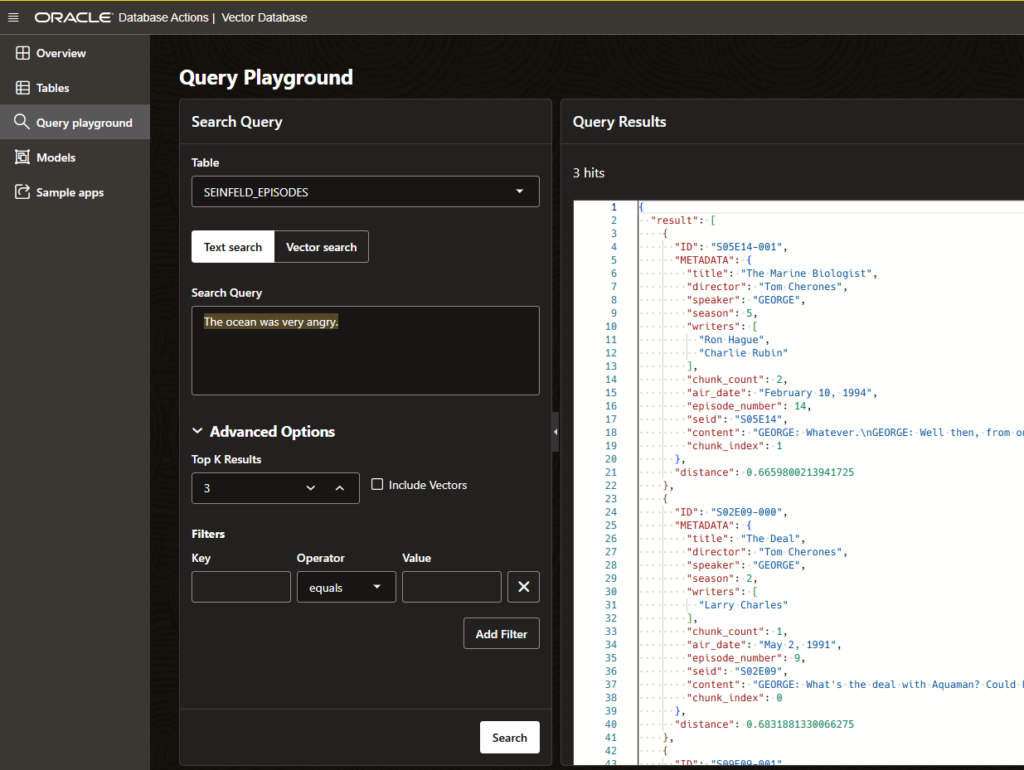
The results are back, and the top one is as we expected, “The Marine Biologist” from season 5, episode 14.
It may be a bit unreliable to ONLY rely on a VECTOR similarity search, ESPECIALLY when we have more qualifiers or search predicates.
For example, I know there’s a famous speech where George talks about every decision he made being wrong, and I KNOW it’s from season 5. So to increase my chances of getting it right, I can add season=5 in the Filter.
The search is ‘Every idea I have is wrong,’ and that helps us find “The Opposite” where George says – “Every instinct I had, in every aspect of life, be it clothing, food – everything was wrong.”

Here is how a REST API call looks like –
POST http://...ords/hr/_db-api/stable/vecdb/vector-tables/SEINFELD_EPISODES/query
{"queryBy":{"text":"Every idea I have is wrong."},"topK":3,"includeVectors":true,"filters":{"$and":[{"$or":[{"season":{"$eq":"5"}},{"season":{"$eq":5}}]}]}}
Is this example ridiculous? Yes. But I was doing this in my free time over the weekend, and I chose to take the silly route. I suppose we could live with another HR.EMPLOYEES table, but I prefer not to.
How about some real-life examples?
What makes our approach interesting? What do you get from having vector similarity + structured JSON metadata filtering in the same query, vs a separate vector DB joined to the data?
Here are some ideas by sector:
Banking — SAR triage/fraud investigations. Investigators write free-form case notes about suspicious activity. A similarity search of previous case narratives turns up “here are 8 previous cases that read like this,” filtered by metadata (transaction amount range, customer risk level, geography, date window). Cuts investigation time by reusing institutional memory instead of offloading it — and because the DB is the same as transaction data, you don’t send PII to external vector storage.
Retail — dedup/matching supplier catalogue. When receiving feeds from multiple suppliers, product descriptions rarely match verbatim (“Men’s Slim Fit Oxford Shirt” vs “Slim Oxford Shirt, Men”). Similarity vectors on description + attributes catch near-duplicate SKUs that don’t match keywords, while JSON metadata filters (category, price range, stock status) keep matches from falling into irrelevant categories. Useful for catalog cleaning and “customers also consider” recommendations.
Government — 311/constituent complaint route. People describe the same underlying problem in very different language (“pothole in my road” vs “damage to the road surface near the intersection”). Similarity searches group these clusters into the same case/department automatically and highlight recurring problem locations, filtered by neighborhood/district metadata and date — useful for routing and for finding missing infrastructure patterns that explicitly report an association.
Nonprofit — grant/fund matching. Match nonprofit program descriptions with funders’ RFP language databases to surface relevant grant opportunities (or vice versa: funders match applicant programs to their granting priorities), filtered by metadata such as award size, deadline, and geographic scope. Changing “search 200 RFPs by hand” to “here are 6 that are really a good fit.”
Take away: hybrid queries (semantic + structured filters, one round trip, one logging system) are the winners!
The post 2 ORDS REST API options for 26ai Database Vectors first appeared on ThatJeffSmith.
PakarPBN
A Private Blog Network (PBN) is a collection of websites that are controlled by a single individual or organization and used primarily to build backlinks to a “money site” in order to influence its ranking in search engines such as Google. The core idea behind a PBN is based on the importance of backlinks in Google’s ranking algorithm. Since Google views backlinks as signals of authority and trust, some website owners attempt to artificially create these signals through a controlled network of sites.
In a typical PBN setup, the owner acquires expired or aged domains that already have existing authority, backlinks, and history. These domains are rebuilt with new content and hosted separately, often using different IP addresses, hosting providers, themes, and ownership details to make them appear unrelated. Within the content published on these sites, links are strategically placed that point to the main website the owner wants to rank higher. By doing this, the owner attempts to pass link equity (also known as “link juice”) from the PBN sites to the target website.
The purpose of a PBN is to give the impression that the target website is naturally earning links from multiple independent sources. If done effectively, this can temporarily improve keyword rankings, increase organic visibility, and drive more traffic from search results.