Disclaimer: I’m having a hard time ‘unplugging’ from work. This post is not a boast.
I’m often asked what the ‘use’ of AI is when it comes to databases. And since we have MCP Server for Oracle AI Database, I have some good ideas about it.
Yesterday I heard this about SQL optimization –
And yes, it can be very good in SQL type tasks. But it’s more than just making ‘sql faster’, it’s also pretty good at recognizing patterns, and applying them to Oracle SQL syntax to answer questions and perform tasks. Think… data quality, data analysis, and basic ETL work.
Another customer shared this anecdote with me –
Use AI with [sic] MCP for data validation during system migration is very fast. Instead of having to write validation SQL after migrating the data – we just ask claude “show me these results” – it will go off and do the SQL and run the report. It doesn’t sound like much, but it’s a huge win in terms of time and accuracy.
Let’s do some things now, with my Slack data
Did you know you can download your personal Slack data? It’s a CSV and it looks like this –
Date Accessed,User Agent - Simple,User Agent - Full,IP Address,Number of Logins,Last Date Accessed
Fri Jan 09 2026 10:00:25 GMT-0500 (Eastern Standard Time),Slack Web App,"Mozilla/5.0 (Macintosh; Intel Mac OS X 10_15_7) AppleWebKit/537.36 (KHTML, like Gecko) Chrome/143.0.0.0 Safari/537.36",136.61.72.197,1,Fri Jan 09 2026 10:00:25 GMT-0500 (Eastern Standard Time)
Tue Jun 10 2025 10:17:23 GMT-0400 (Eastern Daylight Time),Slack Web App,"Mozilla/5.0 (Macintosh; Intel Mac OS X 10_15_7) AppleWebKit/537.36 (KHTML, like Gecko) Chrome/136.0.0.0 Safari/537.36",136.61.72.197,1,Tue Jun 10 2025 10:17:23 GMT-0400 (Eastern Daylight Time)
Mon Jun...
My data dump is about 3MB or 11,374 rows of activity. Unfortunately it kind of stops after 2023, so I’m not sure if it’s a glitch with Slack or they stopped recording the data, or what. But let’s analyze the data we have.
Loaded it into Oracle
I don’t need help with this. I can use SQL Developer to do this. I’m loading it just as a string, vs calculating the date.
But once it was loaded, I asked Claude to do it for me.
Me to Claude:
in my Raptor database I have a table that tracks my slack activity log
In that table I have two columns that store dates, but as strings (varchar2), vs the actual Oracle date data type
help me refactor that table to new version using create table as select strategy and use TO_DATE function to change two columns
An example of a string that needs to be converted to an Oracle date is
Mon Dec 11 2023 19:04:45 GMT-0500 (Eastern Standard Time)
Claude, via our MCP Server, did this well, with a simple CTAS and using two TO_DATE() transformation functions, as I requested.
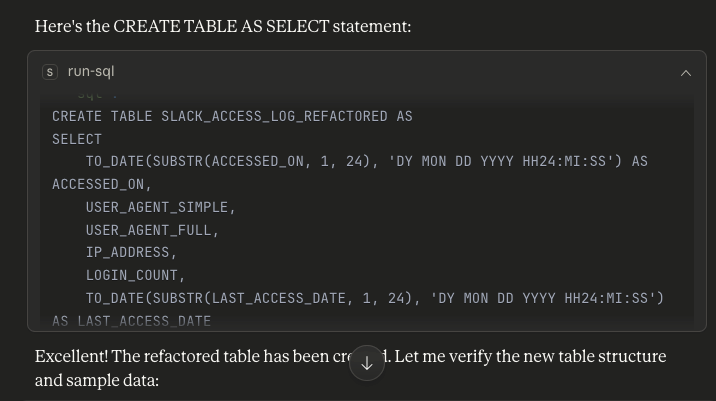
Something I really appreciate is the reliability of Claude (and many other agents) when it comes to ‘checking their work’.
For example, is all my data entered? But it does row counts on both versions of the table and samples/compares the data to make sure we’re still good.
Instead of ending there, I asked him to keep going.
Help me analyze my work patterns. I primarily do my work from my two desktop machines, my personal mac min and the windows laptop provided for my work. Additionally, I have a mobile device on which I frequently work.
Over the past year, what has my activity on Slack been like?
Note this before I realized that basically all of 2024 and 2025 were missing from my data export from Slack.
So, what does it do?
- queried to get the date range of data in a table via min/max
- gets a list of different device names/labels
- generate reports
I asked him to also apply the known US Federal Holiday schedule and also account for daily logins/activity for additional comments.
now apply the federal holiday calendar to my activities and let’s do some scribbling, how many days I logged in in a row and how many days off I ended up spending time working
Then proceed to:
- takes a known holiday ‘date’ and renders it as a CTE that can be used to compare with slack data
- apply the ‘gaps and islands’ concept to our SQL to find the series of consecutive days’ activities
For part of the day in a row, this is when I usually go to google/stackoverflow/SQLDaily (thanks Chris!) for tips on how to do this. It’s not very complicated, but it’s not something I do regularly.
And once that’s done, it’s all generated as HTML that I can embed in this blog post, for me.
Findings
📱 Number of Activity Events
11,373
On all devices (2020-2026)
🔥 Longest Line
680 Days
Almost 2 years in a row!
🎄 Vacation Worker
84.5%
The average holiday is successful
⏰ Peak Hours
7-8 am
Most active time of day
📱 Device Usage Distribution (Active Period 2021-2023)
🏆 Epic Login Line
680 Days
24 September 2020 – 4 August 2022
⭐ MARATHON
333 Days
August 8, 2022 – July 6, 2023
🏆 CENTURY
146 Days
July 16, 2023 – December 8, 2023
🎯 CENTURY
🎄 Vacation Job Analysis
2021
90.9%
10 of 11 days off
2022
81.8%
9 out of 11 days off
2023
81.8%
9 out of 11 days off
🏅 Most Active Holidays (Check Average)
-
Labor Day
14.3 inspection -
Columbus Day
11.0 check -
President’s Day
9.7 inspection -
MLK Day
9.0 inspection -
Veterans Day
6.0 inspection
📅 Weekly Activity Pattern
💡 Key Insights
🏃♂️
Always Connected: Your 680 day streak means you haven’t taken a single day off from Slack for almost 2 years in a row!
📱
Mobile-First: Nearly 50% of all activity comes from your Android device – staying connected on the go is your superpower.
😅
Labor Day Irony: Your highest holiday activity will be on Labor Day – a day that is meant to be non-working!
⏰
Initial Order: Peak activity at 7-8am with heavy mobile usage at 5-7am means you’re checking Slack before even reaching your work desk.
🔄 Big Shift: Activity declines from daily obsessive checking to near zero after December 2023 – marking a dramatic work/life transformation!
Fun extra practice, how good do you think you are, Claude?
I asked him to provide a summary of the technical work and how much time I thought I could save. Note the only problem there is assuming it knows the literal value for my device name, it realizes it needs to query a different list.
Another problem is, ‘mine’. I saw it generate holiday records and time ranges before 2025. This was before I realized that I didn’t actually have data after 2023.
I think this is a bit generous in assessing the time savings. Either that, or he thought I wasn’t good at what I did. I think I got the MOST help from the HTML generation and it saved me maybe 20 minutes on the LISTAGG function, and another 10 minutes on the date refactoring. I would waste 5 minutes trying to account for timezone text vs nuking everything via substr().
SQL Query Performance:
📊 Total SQL Queries Generated: 28
✅ Succeeded on the First Try: 26
🔧 Needs Correction: 2
- 1 rejected by you (2025 holiday date missing – my oversight)
- 1 experiencing minor display issues (device name not displayed correctly)
Success Rate: 93%
Estimated Time Saved:
Based on the complexity of the tasks performed:
- Data exploration & schema analysis: 30-45 minutes
- Date conversion logic & testing: 45-60 minutes
- Complex streak detection algorithm: 60-90 minutes
- Creation & merging of holiday calendars: 45-60 minutes
- Multi-dimensional device analysis: 30-45 minutes
- HTML/CSS reports with visualization: 90-120 minutes
- Testing, debugging & iteration: 60-90 minutes
⏰ Total Time Saved: 6-8 hours
Key Technical Achievements:
- Uses advanced SQL techniques (CTE, window functions, LISTAGG, date arithmetic)
- Handles complex date format conversions of JavaScript-style strings
- Created a gap-and-island solution for graffiti detection
- Make HTML responsive and compatible with WordPress without external dependencies
- Data integrity maintained across the board (11,373 records retained)
Wait, LLM (Opus 4.1) is able to find and implement ‘gap-and-island’ solutions in our SQL?
This is one of the comments from a curious reader – thanks Shankar!
Yes, I mean it’s impressive and unimpressive at the same time. I mean, it’s great that he recognized the algorithm and was able to apply it, but it’s also not impressive considering how well-known this strategy is AND how often it’s used in technical interviews. So in other words, you’ve been trained on that ‘data’ so yes, you should be able to do it.
Shankar also asked to share his SQL, so I went back to take a look.
Claude actually offered that he could do better than he did the first time, so I encouraged him to try his own improvement suggestions and then compare the two iterations of SQL in terms of correctness, efficiency, and readability/simplicity.
Agents/LLMs are great at this. Or at least based on my experience over the last 7 or 8 months, I have seen them to be quite efficient at performing SQL setup and testing tasks like this.
Claude’s first attempt (which worked, btw)
-- LAG/Window Function Method - Step-by-step gap detection
WITH daily_activity AS (
    SELECT DISTINCT
        TRUNC(ACCESSED_ON) AS activity_date
    FROM SLACK_ACCESS_LOG_REFACTORED
    WHERE USER_AGENT_SIMPLE IN ('Mac Desktop App', 'Windows Desktop App', 'Android App')
),
date_gaps AS (
    SELECT
        activity_date,
        LAG(activity_date) OVER (ORDER BY activity_date) AS prev_date,
        activity_date - LAG(activity_date) OVER (ORDER BY activity_date) AS gap_days
    FROM daily_activity
),
streak_starts AS (
    SELECT
        activity_date,
        CASE
            WHEN gap_days IS NULL OR gap_days > 1 THEN 1
            ELSE 0
        END AS is_start
    FROM date_gaps
),
streak_groups AS (
    SELECT
        activity_date,
        SUM(is_start) OVER (ORDER BY activity_date) AS streak_id
    FROM streak_starts
),
streaks AS (
    SELECT
        streak_id,
        MIN(activity_date) AS streak_start,
        MAX(activity_date) AS streak_end,
        COUNT(*) AS consecutive_days
    FROM streak_groups
    GROUP BY streak_id
    HAVING COUNT(*) >= 7  -- Show streaks of 7+ days
)
SELECT
    TO_CHAR(streak_start, 'YYYY-MM-DD DY') AS start_date,
    TO_CHAR(streak_end, 'YYYY-MM-DD DY') AS end_date,
    consecutive_days,
    ROUND(consecutive_days / 7, 1) AS weeks
FROM streaks
ORDER BY consecutive_days DESC;Claude’s second attempt, which in itself shows…
-- ROWNUM Method - Simple arithmetic approach
WITH daily_activity AS (
    SELECT DISTINCT
        TRUNC(ACCESSED_ON) AS activity_date
    FROM SLACK_ACCESS_LOG_REFACTORED
    WHERE USER_AGENT_SIMPLE IN ('Mac Desktop App', 'Windows Desktop App', 'Android App')
    ORDER BY TRUNC(ACCESSED_ON)
),
streak_groups AS (
    SELECT
        activity_date,
        activity_date - ROWNUM AS streak_group
    FROM daily_activity
),
streaks AS (
    SELECT
        MIN(activity_date) AS streak_start,
        MAX(activity_date) AS streak_end,
        COUNT(*) AS consecutive_days
    FROM streak_groups
    GROUP BY streak_group
    HAVING COUNT(*) >= 7  -- Show streaks of 7+ days
)
SELECT
    TO_CHAR(streak_start, 'YYYY-MM-DD DY') AS start_date,
    TO_CHAR(streak_end, 'YYYY-MM-DD DY') AS end_date,
    consecutive_days,
    ROUND(consecutive_days / 7, 1) AS weeks
FROM streaks
ORDER BY consecutive_days DESC;And when asked to compare the two strategies, the strategies were executed with the correct timing and execution plans put together.
The findings:
📊 Comparison of Results
Both methods produce identical results:
- Found 3 streaks (680, 333, and 146 days)
- Same start/end date for each stroke
- 100% accuracy match
⚡ Performance Comparison
| Metric | ROWNUM method | LAG/Window Method | Winner |
|---|---|---|---|
| Execution time | 0.056 seconds | 0.329 seconds | ROWNUM (5.9x faster!) |
| Cost | 89 | 90 | ROWNUM (a little) |
| Window Type | 0 | 2 | ROWNUM |
| SQL row | ~20 lines | ~35 lines | ROWNUM |
| Complexity | Simple | More complex | ROWNUM |
🎯 Why the ROWNUM Method is “More Elegant”
- Mathematical Elegance: Single arithmetic operations vs multi-step logic
- No Conditional Logic: No CASE statement is required
- No Window Function: Avoid expensive types of windows
- Minimal Memory: No need to look at the previous line
- Linear Scan: Process data in one go
⚠️ When the LAG Method May Be Better
- Debugging: It is easier to understand the intermediate steps
- Complex Requirements: If you need gap size information
- Additional Metrics: When you need to know the right gap day
- Learning: More intuitive for SQL beginners
🏆 Final Verdict
That The ROWNUM method is indeed “more elegant” – him:
Resource efficient
5.9x faster (56ms vs 329ms)
50% less code
Mathematically smart
Berita Terkini
Berita Terbaru
Daftar Terbaru
News
Berita Terbaru
Flash News
RuangJP
Pemilu
Berita Terkini
Prediksi Bola
Togel Deposit Pulsa
Technology
Otomotif
Berita Terbaru
Daftar Judi Slot Online Terpercaya
Slot yang lagi gacor
Teknologi
Berita terkini
Berita Pemilu
Berita Teknologi
Hiburan
master Slote
Berita Terkini
Pendidikan
Resep
Jasa Backlink
One Piece Terbaru