I have two environments:
- HR123 – I started a simple schema with just two tables, and no comments, indexes, constraints, etc
- HR456 – I have a Codex that helps me come up with what a real HR system would look like
What do I want
I would like to point my Oracle tools at two environments (schema), and provide a list of their differences. This ‘difference’ will be expressed as a SQL script that will allow me to update the HR123, to match what I have on the HR456.
How to get there
Just start SQLcl (download | documents), no connection required. However, you need two connections defined, one for the target and one for the destination schema.
These can be in the same or different databases. In my example, these are two different schemas in the same database.
Run the DIFF command. By default, the output will return as a ZIP file in the current working directory.
Once done, unzip the archive, cd to root level, and launch VS Code or your favorite IDE.
-- startup SQlcl
Macmini:~ thatjeffsmith$ /opt/sqlcl/26.1.2/sqlcl/bin/sql /nolog

SQLcl: Release 26.1 Production on Fri Jun 05 11:37:25 2026

Copyright (c) 1982, 2026, Oracle. All rights reserved.

SP2-0640: Not connected
-- do the diff
SQL> diff -source HR123 -target HR456 -artifact-out /Users/thatjeffsmith/diffs/HRs
[diff - info] Preparing clean project directory: /var/folders/80/hvhx7jbd05lf0fsd8wzt089w0000gn/T/diff_project_9517047203889056995
[diff - info] Initializing project with schemas: HR123,HRREST
[diff - info] Generating diffs via project stage against: base_HR123
[diff - info] Generating artifact (SQLcl default location)
[diff - info] Artifact copied from "/var/folders/80/hvhx7jbd05lf0fsd8wzt089w0000gn/T/diff_project_9517047203889056995/artifact/diff_HR123_vs_HRREST.zip" to "/Users/thatjeffsmith/diffs/HRs/diff_HR123_HRREST_artifact.zip"
[diff - info] Success. Diffs under dist/releases/next. Logs at: null
[diff - info] Artifact saved to: /Users/thatjeffsmith/diffs/HRs
SQL> cd /Users/thatjeffsmith/diffs/HRs
SQL> !unzip diff_HR123_HRREST_artifact.zip
Archive: diff_HR123_HRREST_artifact.zip
 inflating: releases/next/changes/target_hrrest/hrrest/procedures/secure_dml.sql
 inflating: releases/next/changes/target_hrrest/hrrest/procedures/add_job_history.sql
 inflating: releases/next/changes/target_hrrest/hrrest/comments/jobs.sql
 inflating: releases/next/changes/target_hrrest/hrrest/comments/departments.sql
 inflating: releases/next/changes/target_hrrest/hrrest/comments/regions.sql
 inflating: releases/next/changes/target_hrrest/hrrest/comments/countries.sql
 inflating: releases/next/changes/target_hrrest/hrrest/comments/employees.sql
 inflating: releases/next/changes/target_hrrest/hrrest/comments/job_history.sql
 inflating: releases/next/changes/target_hrrest/hrrest/comments/locations.sql
 inflating: releases/next/changes/target_hrrest/hrrest/tables/jobs.sql
 inflating: releases/next/changes/target_hrrest/hrrest/tables/departments.sql
 inflating: releases/next/changes/target_hrrest/hrrest/tables/regions.sql
 inflating: releases/next/changes/target_hrrest/hrrest/tables/countries.sql
 inflating: releases/next/changes/target_hrrest/hrrest/tables/employees.sql
 inflating: releases/next/changes/target_hrrest/hrrest/tables/job_history.sql
 inflating: releases/next/changes/target_hrrest/hrrest/tables/locations.sql
 inflating: releases/next/changes/target_hrrest/hrrest/ref_constraints/dept_loc_fk.sql
 inflating: releases/next/changes/target_hrrest/hrrest/ref_constraints/emp_job_fk.sql
 inflating: releases/next/changes/target_hrrest/hrrest/ref_constraints/jhist_job_fk.sql
 inflating: releases/next/changes/target_hrrest/hrrest/ref_constraints/jhist_dept_fk.sql
 inflating: releases/next/changes/target_hrrest/hrrest/ref_constraints/loc_c_id_fk.sql
 inflating: releases/next/changes/target_hrrest/hrrest/ref_constraints/countr_reg_fk.sql
 inflating: releases/next/changes/target_hrrest/hrrest/ref_constraints/emp_dept_fk.sql
 inflating: releases/next/changes/target_hrrest/hrrest/ref_constraints/jhist_emp_fk.sql
 inflating: releases/next/changes/target_hrrest/hrrest/ref_constraints/dept_mgr_fk.sql
 inflating: releases/next/changes/target_hrrest/hrrest/ref_constraints/emp_manager_fk.sql
 inflating: releases/next/changes/target_hrrest/hrrest/triggers/update_job_history.sql
 inflating: releases/next/changes/target_hrrest/hrrest/triggers/secure_employees.sql
 inflating: releases/next/changes/target_hrrest/hrrest/sequences/departments_seq.sql
 inflating: releases/next/changes/target_hrrest/hrrest/sequences/locations_seq.sql
 inflating: releases/next/changes/target_hrrest/hrrest/sequences/employees_seq.sql
 inflating: releases/next/changes/target_hrrest/hrrest/views/emp_details_view.sql
 inflating: releases/next/changes/target_hrrest/hrrest/indexes/emp_name_ix.sql
 inflating: releases/next/changes/target_hrrest/hrrest/indexes/jhist_department_ix.sql
 inflating: releases/next/changes/target_hrrest/hrrest/indexes/emp_manager_ix.sql
 inflating: releases/next/changes/target_hrrest/hrrest/indexes/emp_department_ix.sql
 inflating: releases/next/changes/target_hrrest/hrrest/indexes/loc_country_ix.sql
 inflating: releases/next/changes/target_hrrest/hrrest/indexes/jhist_employee_ix.sql
 inflating: releases/next/changes/target_hrrest/hrrest/indexes/jhist_job_ix.sql
 inflating: releases/next/changes/target_hrrest/hrrest/indexes/loc_city_ix.sql
 inflating: releases/next/changes/target_hrrest/hrrest/indexes/dept_location_ix.sql
 inflating: releases/next/changes/target_hrrest/hrrest/indexes/emp_emp_id_pk.sql
 inflating: releases/next/changes/target_hrrest/hrrest/indexes/emp_job_ix.sql
 inflating: releases/next/changes/target_hrrest/hrrest/indexes/loc_state_province_ix.sql
 inflating: releases/next/changes/target_hrrest/stage.changelog.sql
 inflating: releases/next/release.changelog.sql
 inflating: releases/main.changelog.sql
 inflating: releases/ords/hrrest/ords.sql
 inflating: releases/ords/ords.changelog.sql
 inflating: utils/recompile.sql
 inflating: utils/prechecks.sql
 inflating: env/defaultProperties.sql
 inflating: env/undefineDefaultProperties.sql
 inflating: install.sql
-- open VS Code
SQL> !code .In VS Code, if I navigate to the ‘next’ release, I will see the upgrade script that our ‘installer’ artifact will run if we actually apply changes to the Source schema. Ultimately, this will match our Target schema.
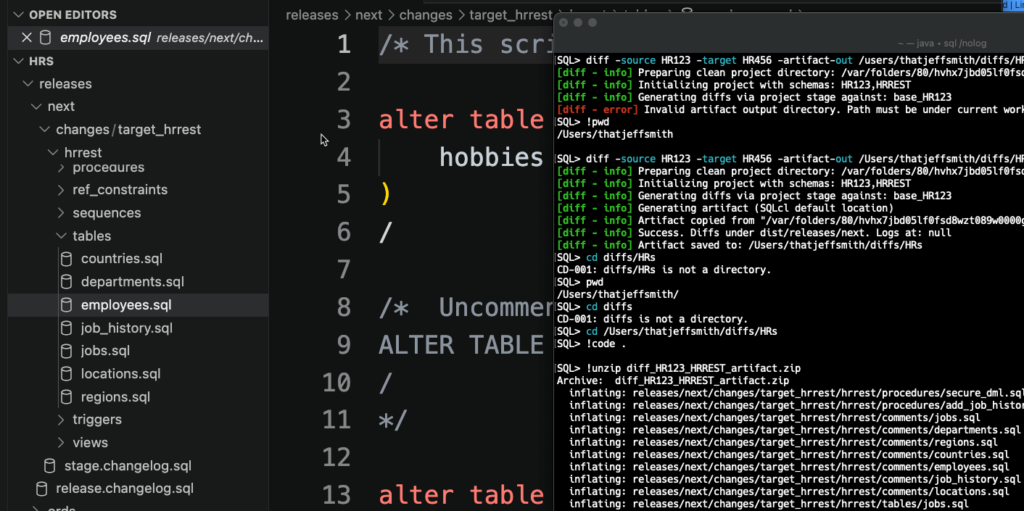
Under my tables folder, I can see some table SQL files, and if I check employees.sql, I see: