In this article we will discuss how to minimize the amount of code that handles Javascript on the Add/Edit page. Building your code based on data will help you manage forms with many fields easily. We will take care of functionalities like showing/hiding fields, making fields readonly, required, disabled, etc.
This approach will involve the following steps
1. Create and populate a database table to store triggers (when to apply the logic) and actions (what happens when the trigger goes off)
2. Server side PHP and C# code that passes this data to Javascript
3. The Javascript code itself that listens for “change” events and implements the logic specified in the database.
Database tables
Trigger table. The structure is quite simple. You can see that we store the table name, page type, field names and what events we listen for. In this article we will only show how to implement the most common “change” events as they cover 95% of the required functionality.

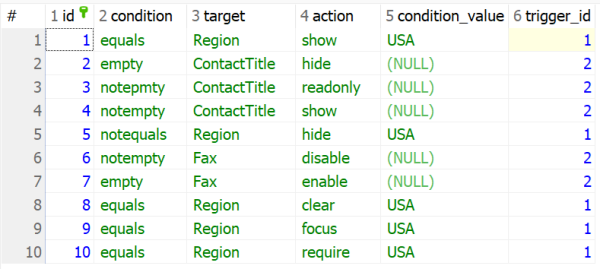
The action table is a detail table while the trigger is the master. They are linked by the trigger_id field. This table tells what conditions to check and what actions to take. Let’s look at the first line and try to decipher it.
This action is related to trigger #1 (change of Country field event on the Edit customer table page). The conditions are the same and the condition_value is ‘AS’. This means that when the Country column equals ‘USA’, we must continue with our action. And the action itself shows the Region field.
And here is a SQL script that will create both tables for you with sample data.
Server side code
Server side code goes into Events Before Display of each page where this function needs to be applied. In our situation, this code goes into the BeforeDisplay event on the Edit Customer table page. The code itself is quite easy. It simply dumps all the data from the actions and trigger tables and makes this data available in Javascript via a proxy object.
Note that for better code structure, you need to create an external PHP or C# file, define functions there and place this code into those functions. Then at all BeforeDisplay events
PHP code
C# code
Javascript code
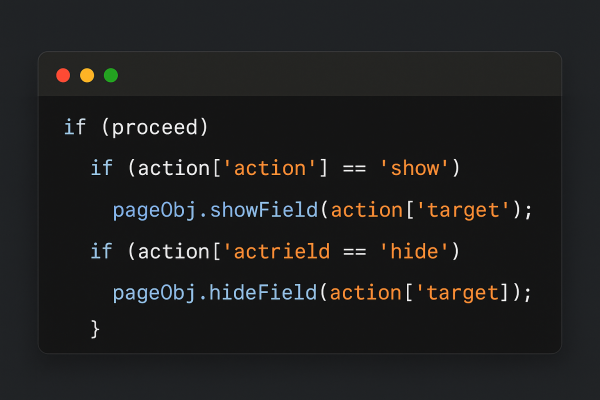
The Javascript code goes to the Javascript OnLoad event on the page where the action is to be performed, in our case it is the Javascript OnLoad event on the Edit Customer table page. The same idea of creating a Javascript function and calling it from an external file also applies here.
You can expand this code by adding more condition types and more actions. Check the inline comments for more info.
Enjoy!
Teknologi Terkini
Agen Togel Terpercaya
Bandar Togel
Sabung Ayam Online
Berita Terkini
Artikel Terbaru
Berita Terbaru
Penerbangan
Berita Politik
Berita Politik
Software
Software Download
Download Aplikasi
Berita Terkini
News
Jasa PBN
Jasa Artikel
News
Breaking News
Berita